

Dashery Presents: YouTube Integration!
Attention all YouTubers! 📢
Dashery is excited to announce that we’ve just released an integration with YouTube! This allows your merch products to populate your channel’s store, and for you to feature your products in your content. You can tag products in your videos, shorts, and live streams. It’s free, easy, and will instantly boost exposure to your merch, since your products will automatically display under each video!
Eligibility: Your YouTube Channel must have a minimum of 1000 subscribers and be eligible for YouTube’s Partner Program. Your Dashery storefront must have at least 1 design published, and be opted in to Off-Site Marketing in your Account Settings.

Sell Your Merch on YouTube in 3 Easy Steps:
1. Connect on YouTube: Log in to your YouTube studio account and navigate to the “earn” section. Click on the “shopping” tab and click “connect” under the stores section. Scroll down the list to select Dashery. Check the box to confirm you agree to the Terms of Service. You’ll be redirected to our YouTube landing page.
2. Connect on Dashery: Click “Connect Now” from the landing page, which will take you to the Apps page in your account settings. Click the YouTube “Connect my account” button, and follow the prompts to get connected.
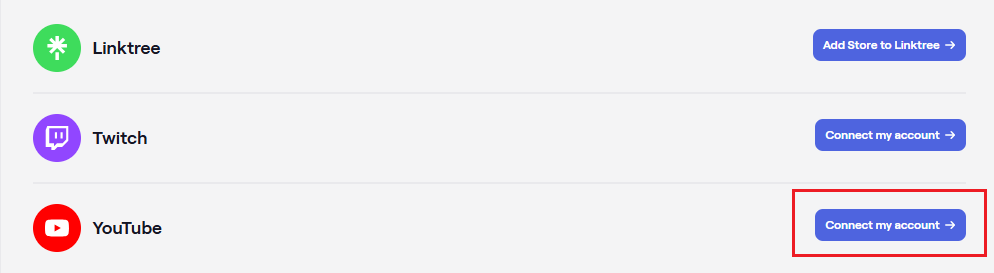
*Note: It may take up to 48 hours for your products to appear in YouTube Studio. Once your products appear, you’ll be able to add them to your videos instantly!
3. Share Your Store: Viewers watching on a small screen or in the YouTube app may not notice your new shop, so it's important to announce your YouTube merch in your videos and on your socials! And be sure to remind them every so often in the intro or outro of your videos.
What are you waiting for?! Connect now to start selling your merch on YouTube!
Have any questions or feedback about this new feature? Let us know at dashery@teepublic.com!
FAQ’s
Is the connection to my Youtube account instant?
No, YouTube reviews all account connections, and it may take up to 48 hours for your products to appear in YouTube Studio. Once your products appear, you’ll be able to add them to your videos instantly!
What YouTube requirements do I have to meet for eligibility?
Your YouTube Channel must have a minimum of 1,000 subscribers and be eligible for YouTube’s Partner Program. If you've never connected a store on YouTube before, you must also accept YouTube Studio's Terms of Service.
I already have a Dashery storefront, and an eligible YouTube Channel. How do I connect?
Log in to your YouTube studio account and navigate to the “Earn” section.
Click on the “Shopping” tab and click “Connect” under the stores section. Scroll down the list to select TeePublic.
Check the box to confirm you agree to the Terms of Service. You’ll be redirected to TeePublic’s YouTube landing page.
Click “Connect Now” on the landing page if you already have an existing Dashery account.
Navigate to the Apps page in your account: https://admin.dashery.com/integrations/social_integrations
Next to YouTube, select “Add Store to YouTube”.
Review the Terms and Conditions and select “Connect”.
Choose the Google account associated with your eligible YouTube Channel.
Authorize TeePublic to connect to your Google account.
Authorize TeePublic to access your Google account’s YouTube Channel.
If the connection is successful, you’ll see your YouTube Channel name on the Dashery Integrations page.
How can I disconnect my Google account if I no longer want to use the YouTube integration?
In order to disconnect your account, you’ll need to navigate to the “Third-party apps and services” page in your Google account. From the list, select TeePublic. From there, you’ll be able to delete any account connections with your Dashery account.
How do I disconnect any other merch stores that may be connected to my YouTube Studio Account?
It’s recommended that you disconnect any other merch store before connecting your Dashery merch store to YouTube. Here’s how:
Log into your Youtube Channel account
Select “Customize channel”
Navigate to “Earn” tab in the left sidebar
Navigate to the “Shopping” accordion on the page and toggle it open to view connected stores
Click the 3 dot menu next to your connected store and click “Remove”
I don’t have a Dashery storefront, but I have an eligible YouTube Channel. How do I get started on Dashery?
Log in to your YouTube studio account and navigate to the "Earn" section.
Click on the “Shopping” tab and click “Connect” under the stores section. In the “Select your Store” modal, scroll down to the bottom of the list to select TeePublic. Click “Continue”.
Check the box to confirm you agree to the Terms of Service. You’ll be redirected to TeePublic’s YouTube landing page.
Click “Sign up” on the landing page to create a new Dashery account. When applying, make sure to select “Opt-in to off-site marketing” in the application. (Note: This ensures products will be available in YouTube studio!)
Upload and publish at least one design to your Merch store (but more would be better!). You must have at least one design published to connect to YouTube.
Navigate to the Apps page in your account: https://admin.dashery.com/integrations/social_integrations
Next to YouTube, select “Add Store to YouTube”.
Review the Terms and Conditions and select “Connect”.
Choose the Google account associated with your eligible YouTube Channel.
Authorize TeePublic to connect to your Google account.
Authorize TeePublic to access your Google account’s YouTube Channel.
If the connection is successful, you’ll see your YouTube Channel name on the Dashery Integrations page.
I’ve connected my accounts, why aren’t products showing up in my videos?
This may be occurring for a few reasons:
Your account is still pending review with YouTube.
Your account may not be eligible for monetization with YouTube.
Some ad-block browser extensions may be blocking the products from appearing.
Your video’s audience is set as “Made for Kids”.
Your video already shows Ticketing or Donations.
Your video has a copyright claim against it.
Your viewer is not in a country or region where the Merch Shelf is available.
Your viewer is watching your video on a mobile browser, smart TV or game console.
You have no YouTube-approved merch items published on Dashery.https://admin.dashery.com/integrations/social_integrations
